Bramble remembers what you
built with AI.
Capture your Claude Code, Codex, and Cursor sessions, then turn messy agent work into notes, project memory, and drafts you can share.
Runs locally. Sensitive values are redacted before anything leaves your machine.
Built for vibe coders, indie builders, founders, PMs, and designers working with AI agents
Reviewing 27,325 sessions across Claude Code, Codex, Cursor, and local AI-assisted projects.
What Bramble does
From messy sessions to useful memory
Bramble captures the work, understands the project, and creates the artifacts you wish you had after every AI-assisted build session.
Capture the session
Bramble watches supported AI coding tools and records the project work without asking you to take notes while you build.
Understand what changed
It turns files, prompts, commands, and errors into a plain-English readout of what moved forward, what got stuck, and what still needs checking.
Remember the project
Bramble keeps track of the arc across sessions, so each new note understands what happened before.
Share when it is worth sharing
Generate drafts for quick updates, dev logs, changelogs, and bigger Ships without starting from a blank page.
From raw session to shareable note
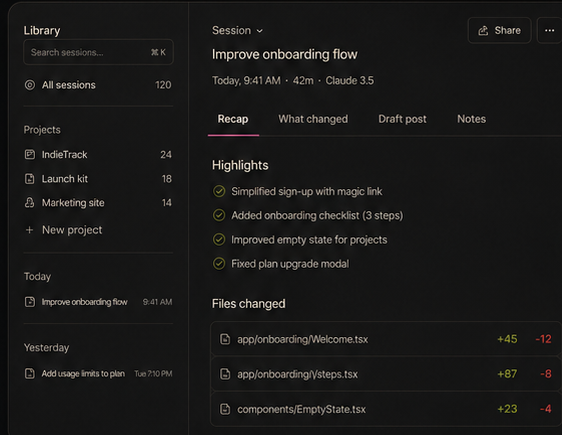
A real session is prompts, file edits, commands, and errors. Bramble turns that into a note you can read, act on, and share.
The session
The note
Improve onboarding flow
Highlights
- Welcome step is now optional and remembers returning users
- Fixed a broken import that crashed the dev server
- Progress bar no longer overlaps the skip button on small screens
Files changed
WelcomeStep.tsx, ProgressBar.tsx, useOnboarding.ts and 2 more
Draft
Shipped a smoother onboarding flow today. The welcome step is optional now, and returning users land straight in the app. Also fixed a layout bug on small screens.
How it works
Build with your AI coding tools
Work the way you already do in Claude Code, Codex, Cursor, or your local project.
Bramble captures and explains what changed
It records the useful signals from your session and translates them into project meaning, not just a list of changed files.
Pick up where you left off or share a draft
Open a clear recap with still-open items, or turn the progress into a short update, dev log, or changelog.
For the people building with agents.
Keep side projects alive
Come back to a project after a week and know what worked, what broke, and what the agent changed. The next prompt is ready.
Explain what changed without rereading logs
Move product work forward with agents, then explain progress to teammates, users, or investors with notes grounded in what actually changed.
Turn building into updates
Shipping in public without turning every build session into a writing session. Useful sessions become short updates, dev logs, or changelogs.